

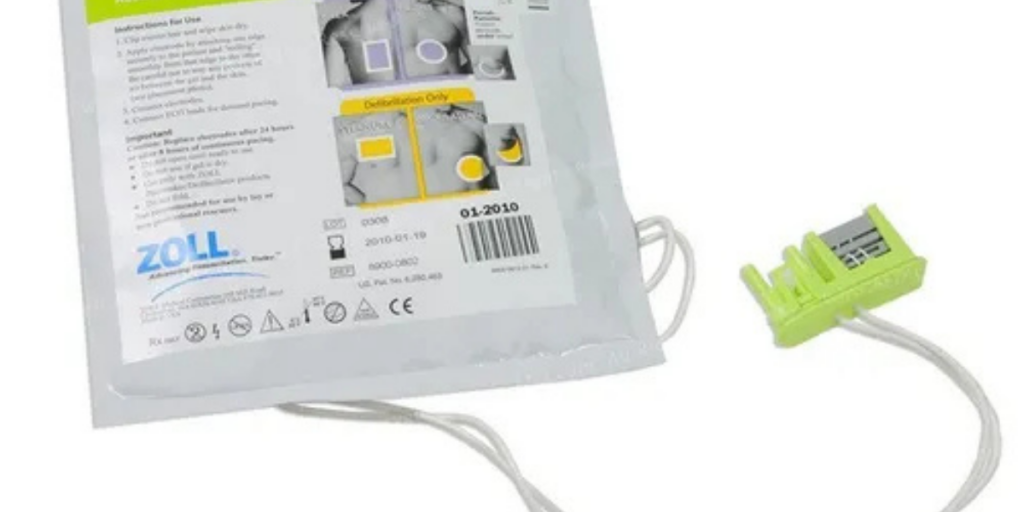
AED pads are one of the simplest parts of an AED program—and one of the easiest to overlook. The AED may be mounted perfectly, the cabinet may be clearly labeled, and the training may be scheduled, but if the pads are expired, damaged, or missing, the unit may not be rescue-ready when you need it most.
Pads are consumables. They’re designed for reliability in an emergency, and that reliability has a shelf life.
This guide explains when to replace AED pads, how to replace them correctly, and how to build a routine that keeps your device in a verified “ready” state—especially in workplaces, schools, gyms, public venues, and multi-site organizations where readiness needs to be consistent and documented.
The Quick Answer
Replace AED pads in any of these situations:
- Immediately after any use (a real rescue, or any time the package was opened)
- By the expiration date (commonly anywhere from about 18 months to 5 years, depending on the model)
- When the AED shows a pad-related alert or your status indicator changes to “not ready”
- If the pad package is damaged (torn, punctured, wet, or compromised)
A simple rule to follow is this: if the pads aren’t sealed, connected properly, and within date, your AED isn’t truly ready.
Why AED Pads Expire Even If They’re Never Used
Many program owners assume pads only “wear out” after a rescue. In reality, expiration dates exist because pads rely on materials that change over time, even when they sit untouched in a cabinet.
AED pads include adhesive and conductive gel that must make firm contact with the skin to allow effective analysis and shock delivery. Over time, that gel can dry out, and adhesives can degrade. Seals can also weaken, especially in environments with heat, cold, humidity, or frequent temperature swings.
So expiration isn’t a technicality. It’s a reliability boundary. Pads that are past their intended window may not stick properly, may not conduct as designed, and may trigger pad faults when the AED is turned on. In an emergency, that is the last thing you want.
When to Replace AED Pads
1) After a Rescue (Always)
AED pads are single-use. Once pads have been applied to a person, they must be replaced. Even if the AED did not deliver a shock, the pads were still used for rhythm analysis and contact, and they should not be saved “just in case.”
After any rescue event, your priority is to return the AED to a verified ready state. Pads replacement is part of that immediate reset, along with checking the device status indicator, confirming the battery condition, and ensuring the AED is reassembled and accessible.
A good readiness mindset is: the AED isn’t “back in service” until you can confirm it’s ready again.
2) When Pads Reach Their Expiration Date
Every pad set has a “use by” date printed on the packaging or cartridge label. That is your hard replacement deadline. Waiting until that date arrives creates two common problems.
First, pads often expire quietly, and teams only notice during an inspection—or worse, when the AED signals a fault. Second, ordering replacements at the last minute can create downtime if shipping is delayed or the wrong pad type is ordered.
Best practice is to plan replacements ahead of time and replace pads early enough that the AED never slips into a “not ready” window.
3) If the Package Is Opened, Torn, Punctured, or Wet
The pad package is part of the product. If the seal is compromised, the pads cannot be trusted.
Even if the pads look fine, an opened or damaged package can allow air, moisture, or contaminants in. That can dry out gel, weaken adhesive, or create pad faults during self-tests.
If you see torn packaging, punctures, water damage, or unclear sealing, treat it as a replacement requirement—not a “maybe.”
4) If the AED Shows a Pad Fault or “Replace Pads” Message
Many AEDs run self-tests and monitor pad connection. If your AED beeps, displays a pad warning, or shows a status indicator that suggests the pads are not properly connected or need replacement, take action immediately.
Sometimes the fix is as simple as reseating the connector. Other times, the pads are expired, incompatible, or damaged.
Either way, your program should treat any pad fault as a readiness issue that must be resolved right away. A warning indicator means the AED is telling you it is not in a reliable state.
5) If Pads Show Visible Damage or Dried Gel
This is less common than expiration issues, but it matters. Pads should be clean, intact, and sticky when opened for a real rescue. If the gel appears dried or the pads don’t adhere properly, they should not be relied upon.
In general, you won’t see this unless pads were stored incorrectly or were past their shelf life. That’s another reason storage and tracking matter.
How to Tell Your AED Is “Not Ready” Because of Pads
The most important habit in AED ownership is understanding what “ready” looks like and treating “not ready” as urgent.
Pad-related readiness issues often show up as:
- The AED is beeping or chirping
- The AED shows a red light, red X, or “attention” symbol
- The display indicates pads not connected, check pads, or replace pads
- A self-test reports a fault
If the AED isn’t showing a clear “ready” indicator, the device is telling you something needs attention. Pads are one of the first places to check because they are often the most time-sensitive consumable.
Adult Pads vs Pediatric Pads (What Many Facilities Forget)
Adult Pads
Most AEDs are deployed with adult pads as the default. They are designed for the general population and are the most common replacement item for workplace and public access AED programs.
Pediatric Capability
Pediatric readiness is often overlooked until it matters. If your facility regularly has children present—schools, childcare centers, youth sports venues, community centers, family-focused venues, houses of worship—pediatric capability should be part of your AED readiness plan.
Different AED models handle pediatric use differently. Some require pediatric pads. Some use a pediatric key or a switch that changes energy settings. The key is not the mechanism—it’s the readiness.
If your environment requires pediatric capability, make sure those components are:
- Present and within date
- Stored where responders can find them quickly
- Labeled clearly so there is no confusion in an emergency
How to Replace AED Pads (High-Level Steps)
Pad replacement varies slightly by manufacturer, but the readiness goals are the same. Keep the process simple and repeatable.
Step 1: Confirm You Have the Correct Pads for Your AED Model
AED pads are not universal. The most common mistake is ordering pads that don’t match the AED’s exact model. Before you open anything, confirm compatibility and expiration dates.
If you manage multiple AED brands across a large organization, this is where a tracking system becomes essential.
Step 2: Remove the Old Pads
If your AED uses a pad connector, unplug it and remove the pads from the cabinet or response kit. If your AED uses a pad cartridge, remove the cartridge according to the device instructions.
Handle the old pads cleanly and remove them fully so they don’t get mixed back into the cabinet.
Step 3: Inspect the Connection Point and Storage Area
Before installing new pads, do a quick check for anything that could interfere with a secure connection—dust, moisture, damage, or debris around the port or cartridge slot.
This takes seconds and can prevent persistent “not ready” indicators after replacement.
Step 4: Install and Connect the New Pads
Install the new pads or pad cartridge and ensure the connection is secure. Many AEDs are designed to store pads pre-connected so they’re ready instantly in an emergency. If your device is designed that way, confirm the pads are connected properly and stored neatly.
If your model stores pads in a sealed package inside the cabinet rather than pre-connected, keep them sealed until use. The point is to follow your AED’s design while preserving the pad seal and readiness.
Step 5: Verify the AED Returns to “Ready” Status
This is the step many people skip, and it’s the most important one.
After replacement, confirm the AED shows its “ready” indicator. If it does not, don’t assume you did it right. Recheck the pad connection, confirm you installed the correct pads, and verify the battery condition. If the unit still shows “not ready,” treat it as a service issue and escalate quickly.
The job isn’t done until the AED is verified ready again.
Step 6: Record the New Expiration Date
Every pad replacement should be logged. Record the new expiration date in your inspection log, digital tracker, or equipment management system. If your program relies on calendar reminders, update them immediately so you never get surprised.
Where to Store AED Pads So They Last and Work When Needed
Pads can fail early if they’re stored in harsh conditions. Storage is part of readiness.
Keep pads in the AED cabinet or response kit, protected from direct sunlight, moisture, and extreme temperature swings. Avoid storing spare pads in hot vehicles, unconditioned outdoor spaces, or high-humidity rooms unless the storage solution is specifically designed and rated for that environment.
If your AED is mounted in an area with known temperature challenges like a warehouse, loading dock, or outdoor enclosure your program should consider whether your cabinet and accessories are appropriate for that setting and whether replacement cycles should be adjusted.
Should You Keep Spare Pads On-Site?
For many facilities, keeping spare pads is a smart, low-cost way to reduce downtime. Spares are especially helpful when:
- Your facility operates 24/7
- Your AED program spans multiple sites
- You have remote locations with slower shipping access
- You host events or have high foot traffic
- You want immediate readiness recovery after a rescue
If you store spare pads, label them clearly with expiration dates, track them like any other readiness item, and store them where they can be accessed quickly when needed.
Common Mistakes That Take AEDs Out of Service
Most AED pad issues aren’t complicated. They’re usually process gaps.
One of the biggest mistakes is waiting until pads expire to order replacements. Another is ordering the wrong pads due to model confusion. Facilities also commonly lose readiness due to poor storage, using live pads for demonstrations, or replacing pads but never confirming the AED returned to a ready state.
Pediatric capability is another frequent blind spot. If children are regularly present, pediatric readiness should be treated as essential not optional.
Make Pad Replacement Part of a Simple Readiness Routine
AED readiness improves dramatically when the program is routine, not reactive.
A monthly check can confirm the AED shows “ready,” the pads are within date, and the cabinet is accessible. A replacement schedule with a buffer helps you swap pads before they become urgent. And clear program ownership knowing who checks, who orders, and who verifies prevents the “everyone thought someone else was handling it” problem.
Readiness is not just having an AED. It’s keeping it continuously rescue-ready.
How Life Support Systems Helps Keep AEDs Rescue-Ready
For many organisations, the challenge isn’t knowing that pads expire. It’s managing pad replacement across departments, buildings, and multiple locations while maintaining compliance, documentation, and consistent readiness.
Life Support Systems supports complete emergency readiness programs, including AED selection, on-site service and inspections, readiness tracking, and replacement planning for pads and batteries. Our goal is to keep your AEDs in a verified ready state so your team can respond with confidence.
Clean, consultative next step
If you want to remove guesswork around pad expiration, replacement timing, and “ready status” verification, request an AED readiness review. We’ll help you confirm what you have, what’s coming due, and what your organisation needs to keep every AED continuously rescue-ready without last-minute surprises.
FAQs
How often do AED pads need to be replaced?
AED pads must be replaced after any use and by their expiration date. Most pads last roughly 18 months to 5 years depending on the AED model.
Do AED pads expire even if the AED is never used?
Yes. The gel and adhesive degrade over time, and pads must be replaced by the printed expiration date to ensure reliability.
What happens if AED pads are expired?
Expired pads may not stick properly, may not conduct effectively, and can trigger AED warnings or faults. They reduce confidence that the AED will perform correctly in an emergency.
Should I replace AED pads after training or practice?
If the package was opened or pads were applied, replace them. For routine training, most organizations use AED trainer units to avoid consuming live rescue supplies.
How do I know which pads fit my AED model?
Pads are model-specific. Check the AED model name and compatible pad part number before ordering. If you manage multiple AED types, use a tracking system to prevent mix-ups.
Can I pre-connect AED pads to the device?
Many AEDs are designed to store pads connected so they’re ready instantly. Follow your AED’s design and manufacturer guidance, and always verify the AED shows “ready” after installation.
What does it mean when my AED says “check pads” or beeps?
It usually means a pad connection issue, expired pads, incompatible pads, or a failed self-test related to pads. Treat it as a readiness issue and resolve it immediately.
How should AED pads be stored to prevent early failure?
Store pads in a clean, dry AED cabinet or response kit and avoid temperature extremes, direct sunlight, and humidity. Poor storage conditions can shorten pad life.
Do I need pediatric pads at my facility?
If children are regularly present, pediatric capability is strongly recommended. Ensure pediatric pads or accessories are present, within date, and easy to locate.
Should I keep spare AED pads on-site?
Spares are helpful for remote sites, 24/7 operations, multi-location programs, and any facility that wants to restore readiness immediately after a rescue.
After replacing pads, how do I confirm the AED is ready?
Check the AED’s status indicator. The AED should display a clear “ready/OK” signal. If it still shows “not ready,” recheck pad connection and battery condition or schedule service.
What should I replace after using an AED in an emergency?
Replace the pads immediately, check the battery and device status, confirm the AED returns to “ready,” and restock any responder kit items used during the event.
Last updated on 1 month ago
 Call Us
 Email Us