

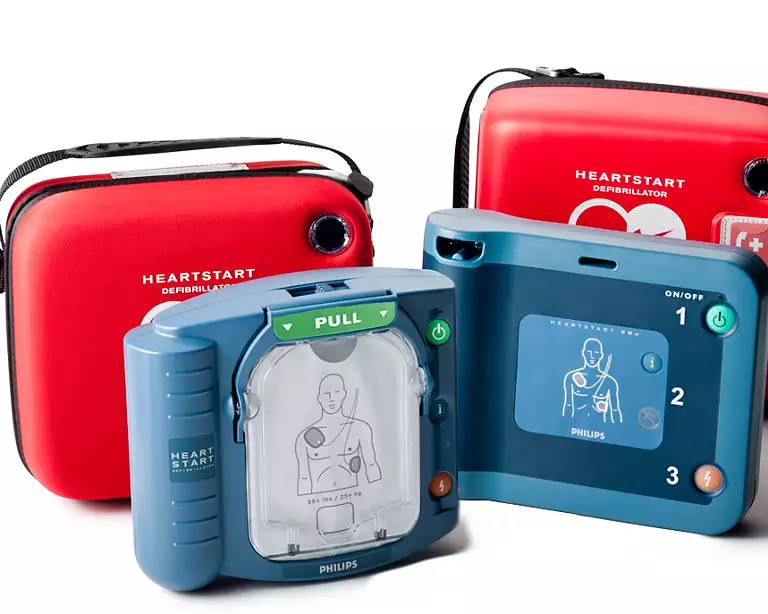
AED accessories don’t usually fail with a dramatic warning. More often, they age quietly. A set of pads can sit sealed in a cabinet for months and look perfectly fine, while the conductive gel slowly dries out. A battery can appear “good” right up until your AED starts chirping, flips to a red status indicator, or fails a self-test.
That’s why the date printed on AED accessories matters. It isn’t just a label for inventory. It’s a readiness deadline.
In this guide, we’ll explain what those dates typically mean, why there are different date types on pads versus batteries, what common symbols are trying to tell you, and how to build a simple monthly routine that keeps your AED in a verified “ready” state—especially if you manage multiple locations.
Why Those Dates Matter For AED Readiness
An AED program is measured by readiness, not ownership. Having an AED on the wall is only the beginning. The question that matters in an emergency is whether the unit will power on instantly and deliver clear prompts, analysis, and shock therapy when required.
Pads and batteries are the two most time-sensitive parts of most AED programs. They expire, they degrade, and they’re often the first reason an AED becomes “not ready.” The date on an accessory is the manufacturer’s way of telling you when reliability can no longer be assumed.
If the accessory is past its date, your AED may still power on, but you can’t count on performance the way you should in a lifesaving moment. And if a self-test detects an expired or faulty component, the AED may alert you—sometimes loudly, sometimes silently, with a status change—until the issue is resolved.
This is where AED maintenance services play a critical role. Regular inspections, scheduled pad and battery replacements, and routine readiness checks ensure your device stays compliant and fully operational at all times. A structured maintenance plan removes the guesswork, helping you track expiration dates, respond to alerts quickly, and keep your AED rescue-ready—so when an emergency happens, your equipment performs exactly as expected.
What That Date Is Really Telling You
Instead of thinking “What does this date mean?” it helps to ask a better question:
Is this date telling me when I must replace the accessory, or is it telling me when it was made or needs to be installed by?
AED accessories commonly show one of three date types. Understanding which one you’re looking at is the key to managing replacements correctly without wasting supplies or risking readiness.
Three Common Date Types You’ll See On AED Accessories
Expiration Date (Use-By Date)
This is the most straightforward and the most important. An expiration date (often called a “use-by” date) tells you the accessory should be replaced by that date to maintain reliability.
For AED pads, the expiration date is typically the critical deadline. Pads rely on gel and adhesive performance, and expiration dates exist because those materials change over time—even if the pads were never opened.
Batteries may also carry a true expiration date, depending on the manufacturer and model. If you see a clear “use by” date on a battery, treat it as a hard replacement deadline.
Date Of Manufacture
A date of manufacture is not an expiration date. It tells you when the accessory was produced.
This date is important for tracking and quality control, but it doesn’t automatically tell you when the accessory must be replaced. The problem is that many people see a manufacturing date and assume it is an expiration date.
If you rely on the wrong date, you may replace accessories too early, or you may assume something is “good” when it’s actually past its service window.
Install-By Date (Shelf-Life Deadline)
An install-by date tells you the accessory should be installed by that date to ensure you get the expected lifespan once it’s in service.
This is most commonly associated with some AED batteries. In those cases, the manufacturer may want the battery installed by a certain date so that the battery delivers its intended standby life after installation.
If your battery has an install-by date rather than a clear expiration date, your action step is simple: document the installation date, then replace based on the battery’s expected in-device lifespan and your readiness schedule.
What The Date Means For AED Pads
AED pads are the most common accessory people manage, and they’re also the easiest to misunderstand because they can look fine even when they’re no longer reliable.
Where To Find The Date On Pads
In most cases, you can find the date on the outside packaging without opening anything. It may be printed on:
- The foil pouch label
- The cartridge label (for cartridge-based systems)
- The outer packaging that contains the pad set
You do not need to open sealed pads just to check the date. If you do, you’ve compromised the seal and should plan to replace them.
What The Date Means In Plain Terms
For pads, the date is usually an expiration deadline. It indicates when the adhesive and conductive gel can no longer be expected to perform as designed.
Expired pads can create several problems during a rescue. They may not adhere properly, which slows down the application and compromises contact. The gel may not conduct reliably, which can interfere with analysis and shock delivery. In some cases, the AED may detect a pad issue during a self-test and shift to “not ready.”
The simplest readiness rule is this: If pads are past the date, replace them—don’t delay AED pads replacement when reliability is at stake.
Adult Pads And Pediatric Pads
Both adult and pediatric pads carry dates. The timeline can differ by pad type, manufacturer, and model. If your facility requires pediatric capability, treat pediatric pads as part of your core readiness inventory—not an optional add-on.
If pediatric pads are stored separately from the AED, make sure responders can find them quickly and that the storage location is clearly labeled. A pediatric capability that cannot be located under stress is functionally the same as not having it.
What The Date Means For AED Batteries
AED batteries are where the most confusion happens, because different brands use different labeling approaches.
Some batteries have clear expiration dates. Others show an install-by date. Some show only a date of manufacture. The correct interpretation depends on the labeling language and the symbol set on the battery.
The Key Concept: Battery Life Starts When Installed
Even when batteries include expiration dates, readiness planning should still include installation tracking. Batteries are designed for a specific standby lifespan once installed in the device. If you don’t record install dates, you end up guessing—and guessing leads to either early waste or late replacement.
If your battery shows an install-by date, installation tracking becomes essential. It allows you to plan replacement based on real-time in service, not just time in a warehouse. This is why having a clear process for AED battery replacement is critical to maintaining device reliability and avoiding unexpected failures.
When You Should Replace the Battery Immediately
If your battery shows an install-by date, installation tracking becomes essential. It allows you to plan replacement based on real-time in service, not just time in a warehouse.
When You Should Replace The Battery Immediately
Regardless of the printed date type, replace the battery if your AED:
- Chirps or beeps unexpectedly
- Fails a self-test
- Displays a low-battery warning
- Changes from “ready” to “not ready” with a battery-related alert
Your AED’s readiness indicator should always be treated as a first priority. If the device says it’s not ready, your program is not complete until it returns to a ready status.
Common Symbols People Mistake
AED accessories often include symbols that provide context. While symbols can vary slightly by manufacturer, there are a few common ones that appear frequently.
Hourglass Symbol
This typically indicates an expiration or use-by date. If you see the hourglass next to a date on pads, treat it as a replace-by deadline.
Factory Or Building Symbol
This often indicates date of manufacture. It is not the same as expiration unless explicitly stated.
Temperature Or Storage Symbols
Some labels indicate temperature limitations or storage guidance. This matters because storage conditions can shorten real-world reliability even before the printed expiration date. Pads and batteries stored in extreme heat, cold, or humidity may age faster than expected.
If your AED is stored in a warehouse, vehicle, or near an exterior door where temperature swings occur, your inspection routine should be more consistent and your replacement planning should be proactive.
Where To Find Dates Without Opening Anything
A frequent question from program owners is whether they need to open packages to find dates. In most cases, the answer is no.
For pads, the date is typically visible on the pouch or cartridge label. For batteries, the date is typically printed on the battery body or on the outer battery label.
If a date truly isn’t visible without opening packaging, treat that as a management risk. In an organized AED program, accessory dates should be visible and trackable without compromising seals.
What To Do When A Date Is Approaching
Getting ahead of replacement dates is one of the easiest ways to keep your program continuously ready.
Replace Before You’re Forced To
The best AED programs don’t wait for last-week replacements. They build a buffer window so shipping delays, staffing changes, or schedule conflicts don’t create “out of service” gaps.
A simple approach is to order replacements far enough ahead that you can swap accessories and confirm ready status before the expiration date arrives.
Document Installation Dates
This is the one habit that prevents the most confusion—especially for batteries with install-by or manufacture dates.
Write the install date in your maintenance log and, if your program uses inspection tags, add it there as well. If you manage multiple locations, consider a centralized tracking system so dates don’t disappear when staff changes.
Verify Ready Status After Replacement
After replacing pads or a battery, confirm your AED returns to a clear “ready” indicator.
If it does not, don’t assume it’s fine. Recheck connections, confirm compatibility, and verify other components. If the unit remains “not ready,” it should be inspected and serviced rather than left in an uncertain state.
The Most Common Real-World Mistakes
Most AED readiness issues come from small breakdowns in the process, not from a lack of effort.
One common mistake is confusing an install-by date with an expiration date and discarding usable inventory too early. Another is relying on a battery or pads that should have been replaced because “it still looks fine.”
Ordering the wrong pads or batteries is also frequent, especially in organizations that have multiple AED models across different buildings. Finally, some teams replace accessories but never verify the device returns to ready status—leaving the AED on the wall but not truly ready for rescue.
These problems are avoidable with a simple routine and clear ownership.
A Simple Monthly Check That Prevents Silent Expiration
A monthly check doesn’t need to be complicated. The goal is to confirm the AED is in a ready state and accessories are within date.
Check the readiness indicator, confirm there are no warning beeps, verify pad and battery dates, ensure the cabinet is accessible, and log the check. When this becomes a habit, accessories don’t expire silently and readiness becomes predictable.
How Life Support Systems Supports Ongoing Readiness
Keeping accessories current is easy when you have one device and perfect memory. It becomes harder when you manage multiple AEDs across multiple sites, teams, or states—especially when turnover happens and tracking systems vary.
Life Support Systems supports complete emergency readiness programs that go beyond equipment. We help organizations maintain verified ready status through program oversight, on-site support, and replacement planning so your AEDs remain accessible, current, and ready to perform when needed.
Clean, Form-First Next Step
If you’re unsure what a date on your pads or battery means—or you want a system that prevents silent expirations—request an AED readiness review. We’ll help you confirm what’s installed, what’s coming due, and what your program needs to keep every unit continuously rescue-ready across all locations.
FAQs
What Does The Date On AED Pads Mean?
In most cases, the date on AED pads is an expiration or use-by date. Pads should be replaced by that date to maintain reliable adhesion and conductivity.
What Does The Hourglass Symbol Mean On AED Accessories?
The hourglass symbol typically indicates an expiration or use-by date. If the date has passed, replace the accessory.
Is The Date On My AED Battery Always An Expiration Date?
Not always. Some batteries show an expiration date, while others show an install-by date or a manufacture date. If it’s not clearly an expiration date, document when the battery was installed and plan replacement based on the expected in-device lifespan.
What Happens If AED Pads Are Past Their Date?
Expired pads may not stick properly and may not conduct as reliably. They can also trigger pad faults or readiness warnings on the AED.
Can I Use An AED Battery After The Install-By Date If It Still Works?
An install-by date generally means the battery should be installed by that date to ensure full expected performance. If you’re unsure, replace it or consult a program partner to avoid risking readiness.
Where Can I Find The Expiration Date Without Opening The Pads?
Most pad sets show the date on the foil pouch label or cartridge label. You should not need to open sealed pads to check the date.
Do Pediatric Pads Have Different Dates Than Adult Pads?
They can. Always check the specific pediatric pad packaging or cartridge label and track pediatric dates separately if your facility requires pediatric capability.
How Far In Advance Should I Order Replacement Pads Or Batteries?
Order early enough to avoid downtime. A buffer window helps you replace accessories and confirm ready status before the date arrives.
What Should I Do If My AED Shows “Not Ready” After Replacing An Accessory?
Recheck the connection, confirm compatibility, verify the battery and pads are correct and within date, and if the AED still shows “not ready,” schedule service promptly.
Do Storage Temperatures Affect Pad Or Battery Life?
Yes. Extreme heat, cold, or humidity can shorten reliability. Proper storage and consistent checks help prevent early failure.
What’s The Best Way To Track Dates Across Multiple AED Locations?
Use a centralized tracking system with documented ownership, replacement schedules, and recurring readiness checks so dates don’t get missed during staff changes or site expansions
Last updated on 5 days ago
 Call Us
 Email Us